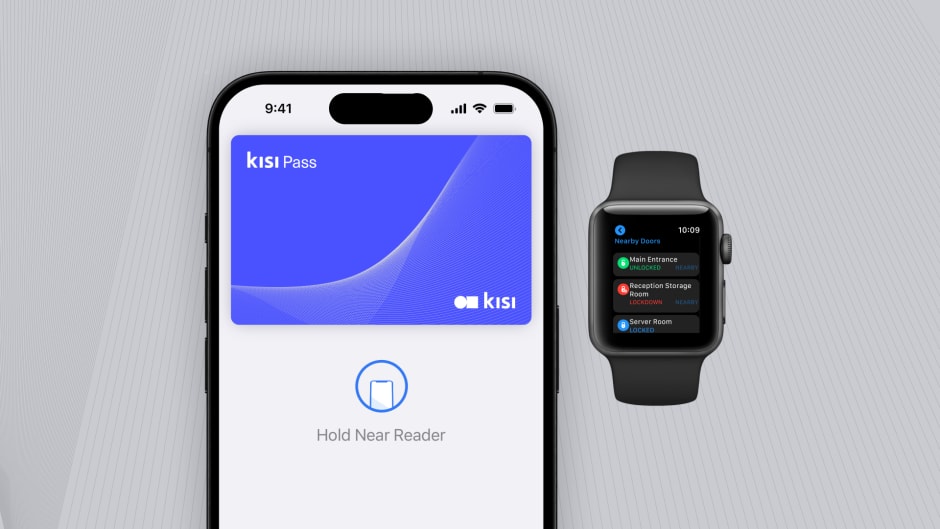
With an employee badge in Apple Wallet, staff and guests can easily access their corporate spaces with just their iPhone or Apple Watch, from doors and elevators to turnstiles, printers, and more. Employees just need to hold their iPhone or Apple Watch near the reader to unlock. It's easy, convenient, and private.
To offer this in your building, you need an access control provider that Apple has certified to issue badges, along with NFC readers that support Apple Wallet at each door. In most existing buildings that means swapping the readers while the controllers, locks and system of record stay where they are, so the upgrade is far smaller than a full replacement.

Apple Wallet for access control #
Benefits of employee badge in Apple Wallet #
Integrating employee badge in Apple Wallet as part of your corporate experience offers an experience upgrade that staff and guests using mobile access have been looking for. It also improves safety and security as well as operational efficiency for admins. Here are top advantages of using Apple Wallet for corporate access cards:
User experience
1. Unlock doors without a physical badge. Employee badges in Apple Wallet on iPhone and Apple Watch allow your staff and customers to enter and leave your office without your physical keys or access cards. That’s one less thing to carry. Thanks to NFC technology, they can access places quickly and safely, all without opening any additional apps. No more downloading separate apps to unlock different doors. Similar to Airplane tickets - which leverage a different protocol - your access badges can co-exist in your Apple Wallet.

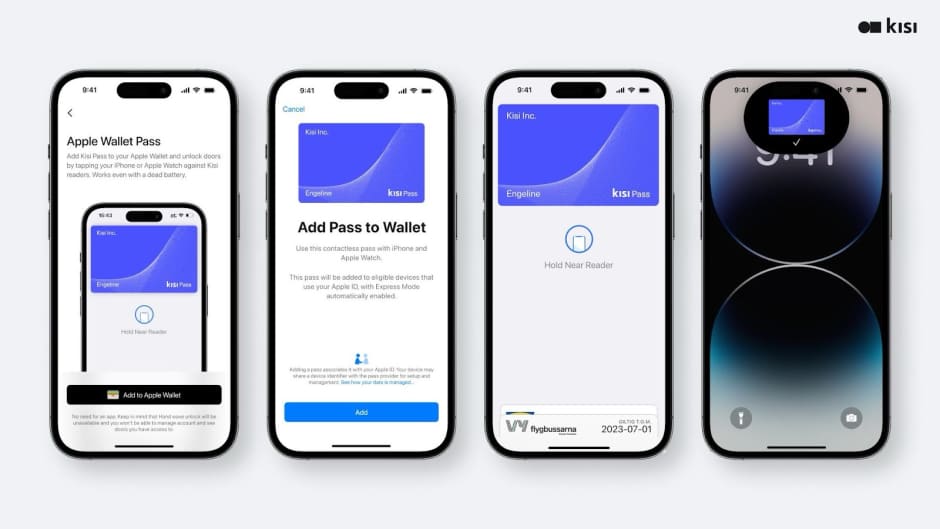
2. Custom branded access badges: Apple Wallet allows for natively designed corporate employee badges.
Safety, security, and backups
1. Get into your building, even when your iPhone needs a charge. If your iPhone battery has run out, your employee badge in Apple Wallet will still work. Power Reserve provides up to five hours of access, so you can still get in your corporate workspace. (source)
2. Users can trigger the suspension of Apple Wallet passes remotely. If a user misplaces their iPhone or Apple Watch, they can use the Find My app to lock and help locate their device and suspend their employee badge or remotely erase the device and its cards and badges in Apple Wallet.
3. Employee badges in Apple Wallet take full advantage of the privacy and security features built into iPhone and Apple Watch. They are stored on the device, which means Apple doesn’t see the places your staff access, so data is private and secure. Additionally, card readers can use Face ID or Touch ID on iPhone to provide additional security for spaces that require it. There is no safer way than storing access credentials on Apple’s native secure element.
Operational efficiency
- Streamlined distribution and sustainability. Forget the hassle of printing physical keys for your employees or tenants. With employee badges in Apple Wallet on iPhone and Apple Watch, you can streamline key distribution and management across your entire portfolio of real estate.
- Onboard with ease. Employee badge in Apple Wallet and NFC badge readers seamlessly integrate into your company’s existing access control systems, and they are easily managed by your internal staff. So getting started is quick and efficient.
- Badges in Apple Wallet. Fewer plastic cards. When your staff or tenants use their iPhone or Apple Watch to get access, it means fewer plastic cards need to be printed, saving money and reducing the use of plastic.
Market trends #
Mobile access technology has been around for a while. Why is now the time for it? As we’ve outlined, Apple Wallet brings new benefits to access control, but is the market ready yet? We’ve asked experts, analyzed our own users’ behavior and willingness to adopt mobile technology, and looked at market studies around proptech investments and ESG sentiment.
Expert opinions #
We’ve asked a few of our partners and clients about their opinion of using Apple Wallet for access control - from access control experts, to integrators, property managers, coworking leaders and workplace platforms - the consensus seems to be that Apple Access is where the future of access control is headed.
Lee Odess

A guiding principle that I hold closely within the realm of real estate technology is the imperative need for us, as developers and operators, to engage tenants on their terms. By gaining a deep understanding of their interaction patterns and technological usage, we can deliver solutions that naturally align with their expectations, effectively shaping the industry's future trajectory.
Apple Wallet represents a paradigm shift, one that propels this ethos further into the forefront of our industry. Tenants now expect the ability to access everything at the click of a button. Credit Card. Transit Fare. Rewards Programs. And now, the key to their apartment. Apple Wallet marks the most significant step in the modernization of access control in the real estate sector in decades.
By incorporating our operations into platforms already used by our residents, we're paving the way for a future where real estate and technology are intrinsically linked. It's an exciting time, indeed.
Mark Zikra, CTO, Property Connect Advisors

Every new tenant signing a lease now requires mobile access - it’s just the easiest way to do it
Commercial Landlord
It will come at one point - it’s the future because it’s Apple.
Access Control Integrator, NYC
Anything that removes barriers to entry is a win for the industry. People want seamless experiences and for everything to just work, Apple is known for that.
Liz Elam, Founder GCUC & Coworking Leader
The coworking and flexible office industries have a huge opportunity to embrace the shift towards hybrid workplaces and embrace the millions of knowledge workers who no longer have access to a company leased office space. But there needs to be a fundamental shift in experience for these customers. In most cases these hybrid customers are not signing up for a membership and going through your well designed member onboarding process. You may never meet them until they book their first day-pass or meeting room, they may come in sporadically, whether booking a day pass once a week or meeting rooms ad-hoc to gather with colleagues. Technology needs to aid coworking operators to provide a delightful experience to hybrid workers as that is key to word of mouth adoption to their colleagues to also book and rebook at your space. This will be enabled by deep integrations into your technology stack with a seamless ‘Guest Access Card’ delivered digitally just in time to provide a delightful experience to your guests, as well as to your community managers. Customers want their experience to be seamless, leveraging native technologies built into smartphones remove friction in the process and allow for time-based reminders to provide reservation confirmation at check-in, but can also provide WiFi credentials, and keyless access when integrated to your access control system. The future is bright for coworking. We as operators and vendors need to step up our game to deliver an amazing experience to meet this opportunity.
Eric Zellhart VP Product, LiquidSpace
User behavior #
At Kisi, we have offered Bluetooth-enabled tap and wave to unlock since 2013. When comparing phone unlocks to card unlocks, 76% of unlocks happen through a mobile experience. This number excludes manual in-app unlocks where users have to press a button in an App. It means that 76% of users are ready to create an account, install an App, enable Bluetooth, give location permission, and so on, to have an amazing access experience. Notably 81% of the mobile unlocks happen on iOS. If users were presented with something easier, faster, and more reliable than the current technology, they would use it.

When comparing mobile based unlock methods used per operating system, it breaks down as follows:
iOS phone based unlock method by type:
- 47% using tap to unlock
- 45.5% using in-app unlock
- 7.5% using motion sense
Android phone based unlock method by type:
- 32.8% using tap to unlock
- 66.7% using in-app unlock
- 0.5% using motion sense

Tenant experience #
Technology is one of the few budget lines real estate owners are still expanding. In Deloitte's 2027 commercial real estate outlook, which surveyed 950 executives in mid-2026, more than 90% said they plan to increase spending on data and technology next year, up from 76% a year earlier. The same respondents expect to tighten spending on office space and talent, and that contrast matters if you're making the case for mobile access internally, because it shows where owners still expect a return.
Much of that money is going into existing buildings rather than new ones. Nearly 80% of the executives surveyed expect to upgrade or reposition assets over the next 12 to 18 months, largely because tenant demand has concentrated in modern, well-located properties while older buildings are left with higher vacancies. Replacing plastic badges with phones and watches is one of the more visible upgrades you can make in that process, since every tenant and visitor experiences it at the front door.
ESG data #
Sustainability has become a quieter conversation in US real estate than it was a few years ago, but the pressure behind it hasn't gone away. Energy costs keep climbing, and cities such as New York now enforce building performance standards that carry financial penalties for underperforming properties, so you're likely to be asked for evidence of efficiency whatever label your organization puts on it. Investors are moving in the same direction: according to INREV's 2026 Investment Intentions Survey, nearly 60% of global real estate investors have set net zero targets, although most are aiming for dates after 2040.
What has changed is the standard of proof, as investors and fund managers are now judged less on the ambition of their decarbonization plans and more on measurable results in specific buildings. Access control contributes to that more directly than most operators expect, because moving badges onto phones ends the recurring cycle of printing and replacing plastic cards, and the unlock data from each door gives you a reliable record of which floors and zones are actually in use. That record means climate control and lighting can follow real occupancy instead of running on floors nobody has entered all day.
Adding your employee badge is easy #
Once your employee badge has been added to Apple Wallet, you can unlock your door by holding your iPhone or Apple Watch near the reader. You don’t even need to wake or unlock your device. It’s that simple.
To understand how this works on the backend, we’ll first take a look at the typical access control adjustments you need to do to offer employee badges in Apple Wallet to your tenants or staff, then explain how corporate badges are added to your phone. Afterward, we’ll discuss how custom employee badges are designed and give an FAQ of the most frequently asked questions about Apple Wallet and employee badges on iPhone.

Ready to replace keycards with a mobile-first experience?
Enable employees to unlock doors with their iPhone or Apple Watch.
How is Apple Access most commonly deployed at a building using Kisi? #
With your current system, you typically need to replace the card reader with an NFC compatible, Apple certified reader. This will allow the pass-through of existing keycard swipes to your current system while being able to also read employee badges in Apple Wallet.

Creating a street-to-seat journey #
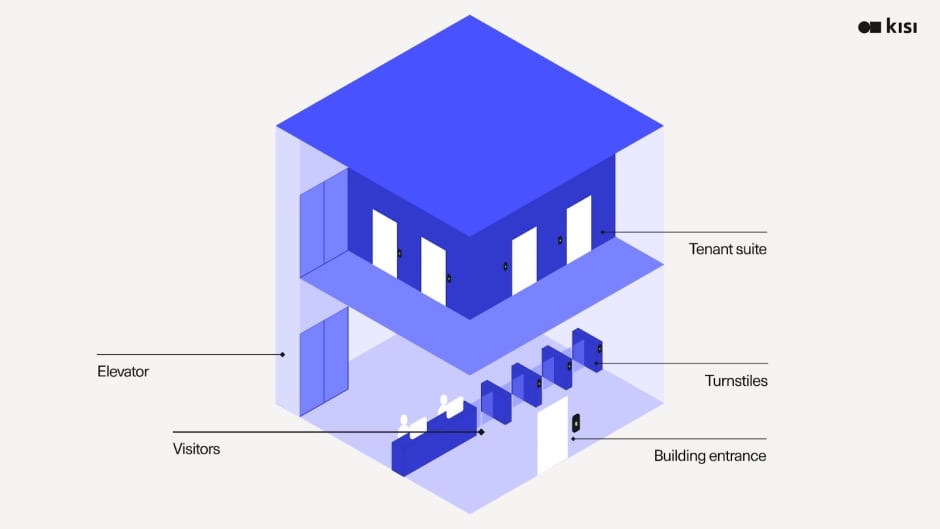
In order for an employee to have the best experience without a plastic access card, we need to consider not only what happens at the tenant space but the spaces in the pathway to get there (i.e., amenities, front door, bike room).
Typically a building operator should consider 3 main access levels:
- Building entrance: How can different tenants access the building with the same type of credential that also works for their tenant suite?
- Elevator or turnstile access: How can those be enabled so it’s a seamless access experience?
- Tenant suite access: How can the tenant choose their own system and still use the credential for the building and elevator or turnstile?
Access control deployment architecture #
When buildings deploy cloud based access control, they typically have two choices:
- Cloud access control with existing readers
- Apple Wallet enabled readers with existing access system
Let’s take a look at the first option.
Cloud access control with existing readers
A regular building setup is to overlay the existing legacy access control panel with the Kisi Controller Pro to enable cloud managed card access via the existing reader.

Let’s look at the second option that would allow for the use of Apple Wallet for access control of the building.
Apple Wallet enabled readers with existing access system
Buildings typically already have access control and want to add Apple Wallet. The typical deployment scenario is pretty straightforward. Essentially, you keep running your existing system as it is today, but switch the frontend for an NFC compatible reader, then forward the card swipes from existing badges through that new reader to the old system and leverage Apple Wallet to manage the mobile credentials in a credential manager like Kisi.

Mobile credential deployment architecture #
Although the end-user application seems simple: “Just hold your phone to the reader” - what happens on the backend when you deploy this technology on the software side, can involve a few different parties.
Some of it happens in the cloud, and some if it happens of course at the property when a user is looking to enter the premises:
- In the cloud a participating entity provisions Apple credential access via a credential manager like Kisi
- At the property there is an Apple certified reader such as the Kisi Reader Pro installed that can read authorized Kisi badges presented through Apple Wallet to trigger the electric lock to unlock.

More in detail: There are six different key elements to make Apple Wallet implementations happen, which we’ll explain in this overview:
1. In the cloud
- Credential managers provide an overall platform that includes a wide variety of different services. They might build an app that includes HR functionality, visitor management, employee engagement, and access credential management.
- However, the access control is provided by an access control vendor typically acting as the “Credential Provider”.
- Apple, who communicates with the credential manager to provide access badges in Apple Wallet.
2. On premises you have:
- Apple certified readers, e.g., Kisi Reader Pro, HID or Wavelynx.
- Access control hardware, e.g., electric locks.
- The participating entity, e.g., the landlord or property management company that governs the property.

Example of Employee badge in Apple Wallet: Enterprise deployment #
In this example we see the different components of a possible enterprise level deployment using Kisi as access management platform and access automation. The following components are used:
- Access control system: In this case the landlord is using a Lenel S2 system that is being overlaid with Kisi. The tenant uses Kisi as access control system.
- Credentials: The building is commonly accessed via HID cards that are enabled for the Kisi Reader Pro. The Kisi Reader also allows to read Kisi employee badges added to Apple Wallet or could allow 3rd party tenant experience Apps like HqO to embed this experience natively into their App, so the end user only has to download one App and never needs to think about having a Kisi mobile app installed.
- Credential management: In this case Kisi is used to manage credentials on the landlord and tenant side. The existing Lenel software is still active with all connections to fire alarm, intrusion system intact and still the system of record for any door openings or police reports required at full control of the landlord.
- Access automation: Kisi is tied in via API with other systems such as Okta which the tenant uses as identity & directory platform as well as Splunk which is a SIEM the tenant uses for data analysis internally. Kisi allows for hybrid access management - users can still be added by the landlord or tenant manually as well — which is required for temporary access such as visitors or service staff including cleaners or maintenance personnel.

Adding employee badges to Apple Wallet on iPhone or Apple Watch #
To unlock the office or building with iPhone or Apple Watch, administrators can provision access for their users in Kisi’s access management software:
- An access credential is issued to the user, for example, by adding their email in Kisi’s access management software.
- The end user receives an email with a prompt to download the Kisi app, register and add the corporate employee badge to Apple Wallet or Apple Watch.
- The end user can unlock permitted building doors, office doors, elevators, turnstiles, printers, or parking gates using their iPhone or Apple Watch.

How does an end user add their employee badge to Apple Wallet to get door access?
Users add their Kisi badge to Apple Wallet from the Kisi app. There are three steps:
- First, you need to download the Kisi app to activate your employee badge.
- Then you can add the employee badge to Apple Wallet and will not be required to keep the Kisi app to unlock doors via iPhone or Apple Watch.
- The user experience is seamless: Hold the iPhone to the Kisi Reader Pro, and Apple Wallet automatically selects the right credential to unlock this door.

Can you add an existing access card to your iPhone? #
In most cases you can't copy a plastic access card into Apple Wallet, because Apple only accepts access badges issued through a provider it has certified, and the card in your pocket was never issued that way. There are technical barriers too. Older 125 kHz proximity cards run on a frequency that iPhone doesn't read at all, and many newer high-frequency cards store credentials in formats that phones aren't permitted to imitate. So the badge has to come from your organization's access control system rather than from the card itself, and that applies to HID cards as much as any other brand.
If you're an employee, the useful step is to ask your facilities or IT team whether your building's system supports employee badges in Apple Wallet. When it does, you'll receive an invitation to the provider's app, where you sign in and tap Add to Apple Wallet. Apple also requires two-factor authentication on your Apple Account before any employee badge can be added, which is worth switching on in advance.
If you manage the building, the change usually starts with replacing door readers with Apple-certified NFC models and choosing a credential manager, as described in the deployment sections above. Because the new readers can pass existing card swipes through to your current system, cards and phones can work side by side during the transition, which means nobody has to switch over on the same day.
Design of employee badges in Apple Wallet #
How to design an employee badge that will live in Apple Wallet?
Apple’s badge design guidelines are accessible in their developer documentation.
In fact, Apple has a native badge designer divided to allow you to upload assets for different devices:
- Icons
- Background images
- Hex colors


Apple Wallet employee badge FAQ #
What is an Apple Wallet, and how does it relate to my company badge #
Apple Wallet is an app on iPhone and Apple Watch that securely and conveniently organizes your credit and debit cards, driver's license or state ID, transit cards, event tickets, home or hotel keys, and more, all in one place. It's like a mobile library for all the cards you were supposed to keep in your wallet before. Now you can add your company badge to Apple Wallet and smoothly unlock all turnstiles, elevators, or doors at your workplace just with a tap of your iPhone or Apple Watch.
Why is NFC better than Bluetooth (BLE)? #
NFC is a very reliable technology already used for most card and phone-based credit card payments. Bluetooth, however, is used to “pair” devices like your wireless speaker to your phone, for example. It is a longer-range technology that can easily experience interference and disturbance and hasn’t been built for short-range secure experiences like payments or access.
Can Apple Wallet employee badges be customized? #
Yes, the company can do it together with the credential provider who submits it.
Can Apple Wallet badges be used across different properties and access systems with Kisi? #
Currently, if you use the same access system in one single account for all your properties, you will be able to use one Apple Badge for all properties. If you have a mixed deployment of different systems you’d like to keep, the end user will need to add multiple Apple Wallet badges to Apple Wallet. However, the user experience will be such that Apple Wallet automatically picks the right credential for the right NFC wall reader.

What happens to expired badges? #
They automatically disappear from Apple Wallet or can be manually removed.
Is there an additional cost to deploy Apple Wallet for access control? #
Kisi readers support Apple Wallet out of the box from Kisi Reader Pro 2.1 onward, so if your doors already run on those readers there is no hardware to replace. Apple Wallet badges are billed as a recurring per-user software license that sits on top of your access control subscription. If your building runs a different system, the main one-off cost is fitting Apple-certified NFC readers at the doors, while the panels, locks and wiring behind them can usually stay in place.
Will Apple Wallet pop up when it’s not set up? #
Apple-certified NFC readers allow consumers to hold their phone to the reader without Apple Pay popping up if it isn’t enabled, even if a credit card exists in there.
What do employees need to add a badge to Apple Wallet? #
Employees need an iPhone on iOS 17 or later with an up-to-date Kisi app, plus a personal Apple Account with two-factor authentication, since Apple doesn't support managed Apple IDs for these passes. Each door needs a Kisi Reader Pro 2.1. The badge syncs to a paired Apple Watch during setup and works on one iPhone and one watch at a time, so moving it to a new phone deactivates it on the old one.
Does this work for employees on Android? #
Employee badges in Apple Wallet are specific to iPhone and Apple Watch, and Kisi doesn't offer an equivalent badge in Google Wallet. Android users unlock through the Kisi app instead, which supports Tap to Unlock on the same Kisi readers, so they hold their phone to the reader without opening the app, and Kisi also runs on Wear OS watches. A team with both iPhones and Android phones can therefore share one access system and one set of readers without anyone falling back to a plastic card.
Solutions and use cases #
Apple-certified Apple Wallet for access control vendors #
Only Apple-certified vendors can be used to provision or unlock doors using Apple Wallet. Many companies act as both credential manager and reader manufacturer, so some names appear in both lists below.
Apple-certified credential managers and access control platforms
Apple Wallet certified NFC reader manufacturers
Kisi
HID (Origo)
LenelS2 (BlueDiamond, now part of Honeywell)
Gallagher
Brivo
Kastle
SafeTrust
SwiftConnect
Soloinsight (CloudGate)
Verkada
Kisi (Reader Pro)
HID
LenelS2
Gallagher
Wavelynx
Allegion
ELATEC
rf IDEAS (WAVE ID)
Certified brands available online as of September 2026. If a brand is missing, please email “apple-wallet@getkisi.com” and let us know which to add.
Terminology #
As defined in Apple Wallet Access Program guidelines:
Access passes
Apple Wallet
Access Passes
Access Credentials
The Wallet app lives right on your iPhone. It’s where you securely keep your credit and debit cards, driver’s license or state ID, transit cards, event tickets, keys, and more — all in one place. And it all works with iPhone or Apple Watch, so you can take less with you but always bring more.
The digital representation of a card in Apple Wallet is called a “pass.”
Apple mobile devices store and protect access credentials on a Secure Element within the device.
Participant Roles
Credential Manager
Credential Provider
Participating Entity
Reader Manufacturer*
The Credential Manager role configures the pass elements and enables the provisioning and life cycle management of passes and credentials for one or multiple access installations.
The Credential Provider role delivers the credential to the Apple Access platform during the provisioning of the pass on the user device.
The Participating Entity is the party that owns or governs the access properties. The Credential Manager and Participating Entity can be the same organization.
Company that provides Apple certified NFC readers. Often same as “Credential Provider”.
Use-Cases
In-app Provisioning
Access NFC Transactions
With in-app provisioning, users can securely create and add passes to their iPhone from the iOS app provided by the Participating Entity or the Credential Manager on behalf of the Participating Entity.
Access NFC transactions allow your users to tap their devices on configured readers to access locations or services available on their pass in Apple Wallet.
Auto-Presentment: The device automatically presents the relevant pass for access when the device is within the range of an associated NFC reader for a location in the access installation.
Express Mode: Express Mode is a pass setting that allows users to skip on-device authentication for NFC transactions.
Terminal Requested Authentication (TRA): Readers can be configured to override the Express Mode pass setting to request on-device authentication from users for all transactions.
Bringing employee badges in Apple Wallet to your building #
For most organizations, the move to Apple Wallet depends less on software than on what's already mounted at the door, because the readers you have today decide whether you're looking at a configuration change or a hardware upgrade. Kisi can run alongside the access control system you already use, which means you can introduce badges in Apple Wallet at a single entrance, see how your team takes to it, and extend it across floors and buildings at your own pace.
If you'd like to know what that would involve for your own doors, a demo with Kisi's team can map it against your current readers and access system.