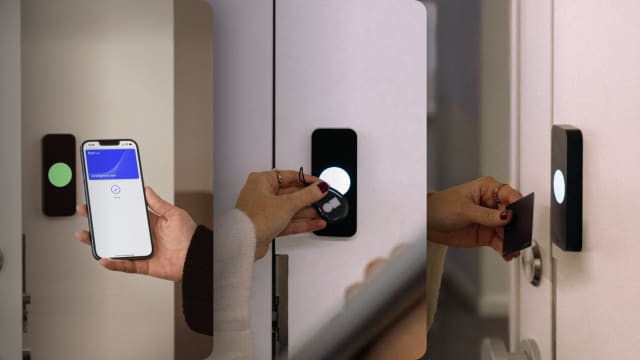


For most gyms, mobile access is the better default. A phone is harder to share than a fob, costs nothing to issue, and stops working as a credential the moment a membership ends. Key fobs still earn a place as a backup for members who don't want to use their phone at the door.
If you're choosing a system for a new gym, or deciding whether to keep the fobs you already have, the difference comes down to three things: how easily members can share access, what happens when a credential goes missing, and how much of it your staff has to manage by hand. Below, we compare all three credential types on the things that matter in a gym, and when each one is the right call.

Mobile access vs key fobs vs key cards at a glance #
Credential prices are industry averages from our access control cost breakdown. Whether doors keep working during an internet outage depends on the system, not the credential, so it's covered further down.
Mobile access vs key fobs for gyms #
Going deeper into the comparison, it’s important to understand where mobile access makes a difference, why fobs are still used and why the industry trends pinpoint into the former’s direction.
Overall, it’s safe to say that mobile access wins on sharing, long-term cost and admin. Key fobs, however, win on simplicity the most since they work for every member, every time, with nothing to download.
At the door, they may seem indiscernible since both do the same job: they let you enter. A fob carries a chip with an ID, which, when the member taps it on the reader, the system checks whether that ID belongs to an active member.
A mobile credential does the same thing, but from the member's phone, through an app. The user taps their phone against the reader, or uses a pass in Apple or Google Wallet, and they enter.
The real difference between the two shows up in time, over months of usage, not initially at the door. Some key aspects include turnover, knowledge over who’s walking in, copying and general habit.
It’s common knowledge that a gym usually signs and loses people every month simultaneously. If a gym were to operate with fobs, each such change, happening over and over would require a manual handover. With access control and implicitly, phones, that happens remotely, through software. .
Not only that, but with fobs, you rarely know who used it, rather just that it was used. A phone is usually far more likely to be in its owner's hand. That also makes copying harder. Many older fobs run at 125 kHz and store an unencrypted ID, which is why they can be copied in seconds with a cheap duplicator. Newer encrypted fobs are indeed harder to clone, but a phone credential adds the phone's own lock screen on top.
Finally, phones have become an extension of a person in the last decade, so it’s unlikely that members will come without at the gym, whereas a fob can be more easily forgotten at home.

Mobile access vs key cards for gyms #
Key cards and key fobs use the same technology, so everything we’ve discussed above pretty much applies to cards too. Cards are easy to share, they get lost, and they cost money to replace. The choice between a card and a fob is mostly about form.
Cards can double as a printed membership card with your logo or a member photo, which some gyms like for the brand. They also bend and crack in gym bags, and they're easier to leave at home.
Fobs live on a keyring, so members tend to have them whenever they have their car or house keys. Overall, they also can take more of a beating and theoretically will last longer.
Against mobile access, cards come out the same way fobs do. If you're already running a key card system, you shouldn’t be necessarily throwing them out. You can make phones the default and any member who prefers the cards can keep using them.
Mobile access, as long as each member's credential is limited to one phone. A fob or card works for whoever holds it, so lending one to a friend takes two seconds. Lending your phone for a whole workout is a much bigger ask.
The weak spots are the same ones in every gym:
- Fobs and cards get handed to a partner or a roommate.
- PIN codes get texted.
- QR codes get screenshotted, unless they expire quickly.
Two settings close most of the remaining gaps. A device restriction stops a member from logging in on a second phone and handing it over. Anti-passback stops a credential from being used twice in a row without an exit, so nobody can pass their phone or fob back out to a friend in the parking lot.
One thing no credential can stop is someone simply walking in behind a member. That's tailgating, and it needs a different fix, which we cover in our guide to preventing gym tailgating. For how to spot sharing in your entry logs and what it costs, see how to stop gym membership sharing.
What happens when a fob is lost, a phone dies or the internet drops? #
In the case of each scenario, there is a fix, as none of them should leave a member stuck outside if the system is set up properly.
For a lost fob or card, the operator can simply switch it off in the dashboard and issue a new one. That costs you the fob plus someone's time, and it happens every month in a busy gym.
In the case of a lost phone, the member logs in on their new phone and you switch off the old credential remotely. A dead phone, however, depends on how the member unlocks:
- An Apple Wallet pass can keep working for up to five hours after the battery runs out on supported iPhones.
- An app unlock needs a working phone.
For members who regularly show up on 2% battery, a backup fob, an intercom at the entrance or a remote unlock from staff covers it.
If the internet goes down, the solution depends on the system, not the credential. A good system stores access permissions locally on the reader and controller, so phones, fobs and cards all keep working, and the entry log syncs once the connection is back.

When key fobs should still be used #
Mobile access is the better default, but it isn't the right answer for every member or every gym. Fobs and cards still make sense in a few cases:
- Members without a smartphone, or who don't want to use one. About 91% of U.S. adults own a smartphone, according to Pew Research Center. That's most of your members, not all of them, and ownership is lower among older adults.
- Youth programs. Younger members may not have a phone, or may not be allowed to bring one.
- Fully staffed studios. If someone at the desk checks every member in anyway, the sharing and admin advantages of mobile matter less.
- Readers you already own. If your fob readers work, you don't have to rip them out. Many cloud systems can run on your existing wiring and readers, so you can add phones on top and phase fobs out over time.
Should a gym offer both mobile access control and fobs? #
Ideally a gym should offer both mobile access and fobs and, in fact, most gyms end up running both. Phones are the default, with fobs or cards for the members who need them.
A setup that works well looks like this:
- Use readers that accept both → Most modern readers read phones, fobs and cards, so one reader per door covers everyone.
- Make mobile the default at signup → When your access system connects to your gym software, each new member gets a phone credential automatically, with no plastic to hand over.
- Issue fobs on request → Keep a small stock at the desk. Some gyms charge a small fee or deposit, which also makes members more likely to return them.
- Let billing switch off both → With the same integration, a cancelled or unpaid membership turns off the member's phone credential and their fob at the same time.
- Use links or QR codes for trials → A QR code or access link that expires on its own is easier than lending out a fob for a day pass.
If you run extended or unstaffed hours, this setup matters even more. There's nobody at the desk to swap a dead fob or let a member in, so every member needs at least one credential that just works.
Frequently asked questions #
How does key fob gym entry work? #
Each member gets a fob with a chip that stores an ID. They tap it on the reader by the door, and the system checks whether that ID belongs to an active member before unlocking. Every tap is logged against the member the fob was issued to, which isn't always the person holding it.
How much do key fobs cost for a gym? #
The fobs themselves typically cost $5 to $10 each. The bigger cost is the system around them: readers, a controller, installation and software, typically $1,500 to $3,500 per door installed. That's the same whether members use fobs or phones, since most modern readers accept both.
Can you switch from key fobs to mobile access without replacing your readers? #
Often, yes. Some readers already accept phones. Where they don't, many cloud systems connect to existing readers over standard wiring, so members can keep using fobs while you roll out phones. Ask your provider which of your current readers and fobs they support.
Are phones more secure than key fobs? #
Usually. A phone credential sits behind the phone's own lock screen and is hard to copy, and you can switch it off remotely. Fobs vary: older 125 kHz fobs can be cloned with cheap tools, while encrypted high-frequency fobs are much harder to copy.
Do gym members prefer apps or key fobs? #
Most members prefer whatever's fastest at the door. A phone tap or wallet pass is as quick as a fob and means one less thing to carry. Some members still prefer a fob, often older members or those who leave their phone in a locker, which is why many gyms offer both.
Give members phones, fobs and cards with Kisi #
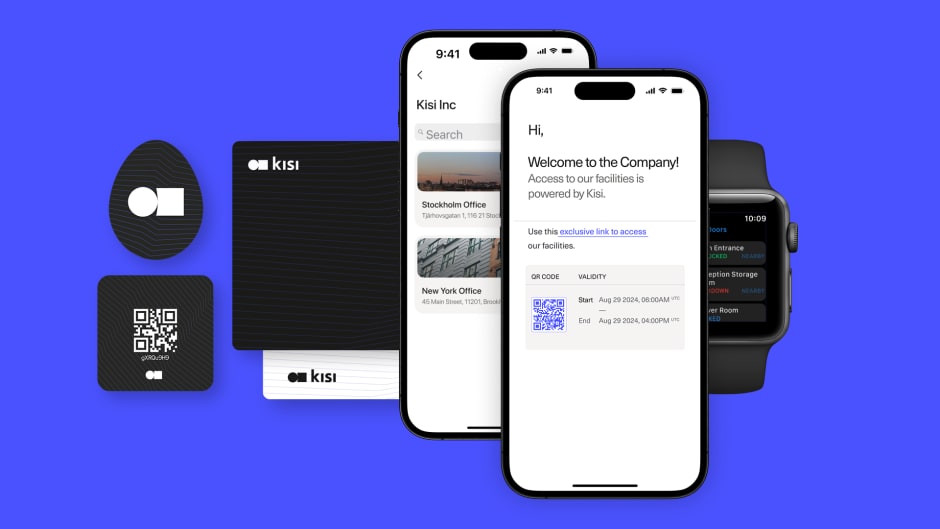
If you want most members on their phones without leaving anyone behind, Kisi supports both on the same reader. Members can unlock with the Kisi app, a tap of their phone or smartwatch, or an Apple Wallet pass, while others keep using Kisi or third-party cards and fobs. Trial members can get a QR code to scan at the Terminal Pro.
Kisi connects to gym software like Mindbody, ABC Glofox and Gymflow, so a new signup gets access automatically and a cancelled membership switches off phone and fob alike.
"Customers love that the gym is equipped with Kisi and ABC Glofox because it's easy and they don't need to remember any badges."
— Ashok Dhariwal, owner, YogaFit Studios
See how it works for gyms, or get in touch to talk through your setup.

Ana Coteneanu
Content writer @ Kisi | Ana focuses on long-form content that explores access control, space monetization, security, and modern workplace operations. With a background in technology-driven industries, she specializes in turning complex topics into practical insights for business audiences.
