

Most access control decisions today are really network decisions. In other words, when controllers, readers, and locks run on the same infrastructure as the rest of your building's technology, a few things happen: installation gets cheaper, management moves to the browser, and doors stop being a separate system that only one technician understands.
In this guide, we go over what IP access control is and how it works, the three deployment types, how IP systems compare to traditional panel-based access control, and how to answer the security questions your IT team will most likely raise.

What is IP access control? #
IP access control is a type of access control architecture in which door controllers and readers communicate over a standard TCP/IP network instead of proprietary wiring. Each controller connects to the local network via Ethernet or Wi-Fi, and administrators manage doors, users, and credentials through software, which today is increasingly hosted in the cloud.
Legacy access control systems relied on dedicated serial wiring between a central control panel and every door, which more often than not made them expensive to install and difficult to scale. IP-based systems changed that by putting access control on the same network infrastructure that businesses already run. Now, when you add a door is akin to adding a mere network device instead of feeling like you’re rewiring a building.
IP-based access control systems have become the standard for modern offices, coworking spaces, gyms, and multi-site businesses.
How IP access control systems work #
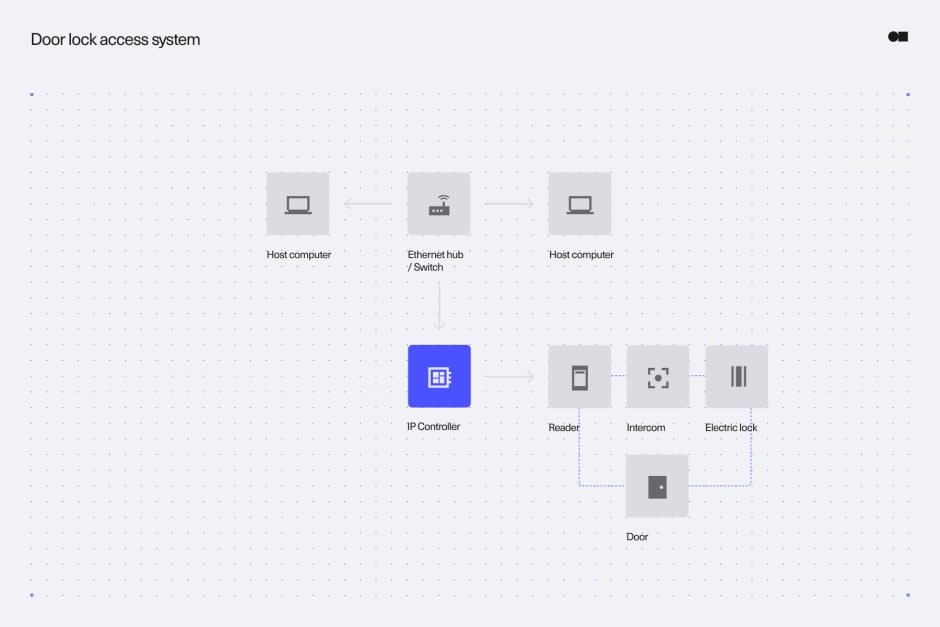
An IP access control system has four working parts: controllers, readers, credentials, and management software. Here is what each one does as part of the whole system.
IP door controllers #
The IP door controller is the local decision-maker. It connects to the network over Ethernet, receives permissions from the management software, and triggers the electric lock when a valid credential is presented. Modern controllers store permissions locally, which means doors keep working even if the network connection drops. Once connection is restored, access events sync back up.
Readers and reader protocols #
The reader is right at the door and passes credential data to the controller. The Wiegand protocol, the industry default for decades, transmits credential data unencrypted and is vulnerable to interception at the wiring level. OSDP (Open Supervised Device Protocol) with Secure Channel has replaced it as the recommended standard: it encrypts reader-to-controller communication and supervises the line, so tampering triggers an alert. If you are evaluating IP access control, OSDP support belongs on your requirements list, and Wiegand should appear only as a legacy constraint you plan to phase out.
Power over Ethernet (PoE) #
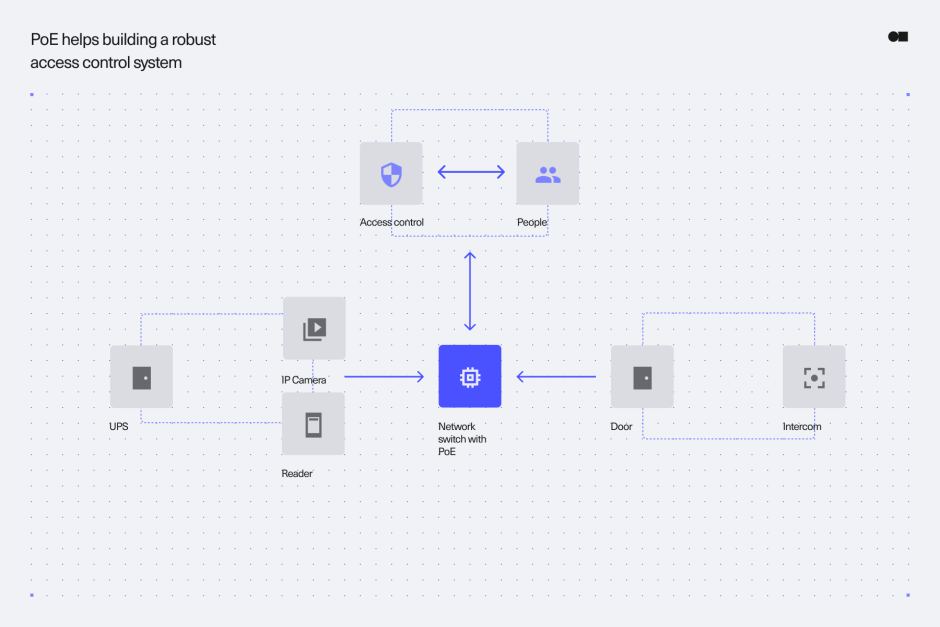
Many IP controllers and readers draw power over the same Ethernet cable that carries their data, using PoE or PoE+. One cable run per door covers both connectivity and power, which cuts installation cost and lets the access system run on the same backup power (UPS) that protects your network switches.
Credentials #
IP access control supports the full range of modern credential types:
- Mobile credentials: the most favoured option, because employees unlock doors with their phones over NFC or Bluetooth.
- Cards and fobs: encrypted smart cards (DESFire EV2/EV3) remain common especially since legacy 125 kHz proximity cards are easy to clone and therefore worth retiring.
- Biometrics: fingerprint or face recognition, typically used as a second factor at high-security doors.
- PIN codes: they are still useful as a backup or second factor, but weak as a sole credential.
Types of IP access control systems #
IP access control systems come in three deployment models, defined by where the management software runs.
Server-based IP access control #
The management software runs on a server your organization owns and maintains, usually on premises. Server-based systems can manage multiple sites from one installation, and they suit organizations with strict data-residency requirements or air-gapped environments. The trade-off is that you own the maintenance, so server hardware, OS patching, software updates, and backups.
Hosted IP access control #
In this case, a third party runs the same style of server software in their data center and you access it remotely. These hosted setups remove the on-site server but often keep the legacy software model underneath, including scheduled maintenance windows and per-server licensing.
Cloud-based IP access control #
The management platform runs as a cloud service, built for the web from the start rather than hosted legacy software. Administrators manage every site and door from a browser or mobile app, software updates ship automatically, and the system scales by adding controllers rather than servers. Cloud-based access control has become the default choice for new deployments, and it is the model companies like Kisi are built on.
IP access control software #
The software layer is where IP access control earns its keep. Whatever the deployment model, look for the following features:
- Remote management: you can grant, change, or revoke access for any user at any site without visiting the door.
- Real-time events and alerts: you can see every unlock as it happens and get notified about held-open doors or forced entries.
- Integrations: you can have video surveillance for visual verification of access events, alarm systems, and identity providers (Okta, Google Workspace, Entra ID) so access rights follow your user directory automatically.
- Automatic updates: cloud platforms patch security issues without an on-site technician, which matters more every year.
- Audit and reporting: you get exportable access logs for compliance and incident investigation.
Differences between IP-based and traditional access control systems #
Traditional access control connects every door to a central panel with dedicated serial wiring. IP-based systems replace that hub-and-spoke wiring with the network you already have.
IP-based systems typically cost less to install in buildings that already have network infrastructure, since cabling labor is the largest cost driver in access control installation.

Ready to move beyond keys and legacy systems?
See how cloud-based access control improves flexibility and visibility.
Is IP access control secure? #
Putting door controllers on the network raises a fair question from every IT team which is “does this expand our attack surface?” Well, yes, it does, and a well-designed IP access system addresses it the same way any critical network device should:
- Encryption in transit — communication between controllers, readers (via OSDP Secure Channel), and the management platform should be encrypted end to end (TLS).
- Network segmentation — access control devices belong on their own VLAN, isolated from general office traffic.
- Signed firmware and automatic updates — controllers should verify firmware signatures and receive security patches without manual intervention.
- Certificate-based device authentication — each controller authenticates to the platform with its own certificate, so a stolen device can be revoked individually.
- NDAA compliance — for US government-adjacent work, confirm the hardware is NDAA-compliant.
Handled this way, an IP access control system is, in fact, more secure than the legacy systems it replaces, because unencrypted Wiegand wiring and unpatched panel firmware were never secure to begin with, just offline.
Benefits and limitations of IP access control #
The benefits follow from everything above: lower installation cost on existing network infrastructure, remote multi-site management, real-time visibility, and an upgrade path that does not require ripping out wiring.
The honest limitations: IP systems depend on your network, so network design and IT involvement are part of the project, not optional. Controllers with local caching keep doors working through outages, and PoE with UPS backup keeps them powered, but both need to be specified up front. If your organization has no IT resource at all, factor in your installer or vendor covering that role.
Frequently asked questions #
What's the difference between IP and cloud-based access control?
The difference is that IP access control describes how the hardware communicates, a.k.a. over a TCP/IP network, while cloud-based access control describes where the management software runs. Most cloud-based systems are IP systems, but an IP system can also be managed by an on-premises server.
Does IP access control work over PoE?
Yes, most modern IP door controllers and many readers are powered over Ethernet (PoE or PoE+), so a single cable per door carries both data and power.
Does IP access control work if the network goes down?
Yes, it does, when the controller caches permissions locally. Doors continue granting access to valid credentials during an outage, and event logs sync once the connection is restored. It’s best to confirm offline behavior when evaluating systems.
What is an IP door controller?
An IP door controller is the device that connects a door's reader and lock to the network. It stores access permissions, decides whether to unlock when a credential is presented, and reports events to the management software.
Conclusion #
In an increasingly competitive world, physical security and data security are essential to maintaining facilities and intellectual property, and must be properly considered. With the implementation of new technologies, the security industry is constantly upgrading, meaning it is more important than ever to future-proof the systems you choose. Under the circumstances, IP-based access control has become crucial for both discretionary and mandatory access control systems with its efficacy and numerous beneficial features. If you're comparing systems, our access control systems hub is the place to start, or book a demo and see how Kisi's cloud-based IP access control behaves on your own doors.

Planning an access control upgrade?
Learn what to look for in a system and how to set your deployment up for success.