

Elevator access control is a security system that regulates who can call an elevator and which floors they can reach inside a building. Instead of letting anyone press any floor button freely, it requires users to verify their credentials first. Also referred to as lift access control in the UK and international markets, the concept is the same regardless of what you call it: only the right people get to the right floors. In this guide, we’ll cover how elevator access control works, the different system types and configurations, and the key considerations for securing elevators in modern buildings.

What is elevator access control #
Elevator access control is a system that restricts which floors a person can access within a building. Instead of allowing unrestricted use of the elevator, users must first authenticate using a credential (such as a key card or mobile device) before being able to select certain floors.
Once a credential is verified, the system enables only the floors that the user is permitted to access. This allows building operators to control movement between different areas, rather than relying on open access to every floor.
Elevator access control is commonly used in office buildings, residential complexes, hotels, and shared spaces where different users require different levels of access. It is often combined with door access control systems to create a consistent security layer across the entire building.
How elevator access control works #
At a basic level, elevator access control works by linking user credentials to floor permissions. Instead of allowing anyone to press any button, the system verifies whether a user is authorized before enabling access to specific floors.
In a typical setup, a user presents a credential to a reader either in the lobby, inside the elevator, or at a destination control panel. The reader sends this request to the access control system, which checks the user’s permissions.
If the user is authorized, the system enables the appropriate floor buttons or allows the user to select their destination. If not, access to those floors remains restricted.
There are two common ways this is implemented:
- Relay-based systems, where floor buttons inside the elevator are activated only after authentication
- Destination dispatch systems (DCS), where users select their floor on a terminal before entering the elevator, and the system assigns them to a specific car
In both cases, the goal is the same: to ensure that people can only travel to floors they are permitted to access, while keeping the experience as seamless as possible.
Types of elevator access control systems #
Single elevator access control #
Single elevators are much more common in smaller buildings that are either shorter or low-volume. As the name implies, there will only be one elevator in this situation, so it can be much easier to set up than an elevator bank.
Elevator banks #
Elevator banks are common in larger or busier buildings. This setup can help with tailgating, which becomes harder to get away with due to the increased scrutiny that comes with elevator banks. While expensive, a destination dispatch system is the most efficient form of elevator bank. Destination dispatch systems are more efficient than individually called elevators because they optimize elevator operations based on the desired destination of passengers.
In buildings with multiple elevators, access control needs to be applied consistently across all cars. This ensures that users can only access authorized floors regardless of which elevator they enter, while also maintaining efficient traffic flow throughout the building.
Smart elevators #
Smart elevators go beyond traditional call-and-go operation. They connect to cloud-based building management platforms, integrate with access control and video surveillance systems, and use destination dispatch to group passengers headed to the same floor. Thus, they cut wait times and reduce the number of stops per trip. In buildings with ten or more floors, this makes a measurable difference in how efficiently people move through the space.
More practically for security teams, smart elevators generate detailed usage data. You can see traffic patterns per floor, flag unusual activity, and tie elevator events directly into your broader security management system. When combined with access control, the credential a user presents doesn't just unlock a floor button, but it automatically routes them to the right elevator car before they even step in.

Simplify access control across every location
Centralize security management without increasing operational complexity.
Types of elevator access control configurations #
Public elevator with private access to selected floors #
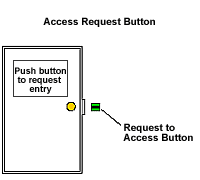
This configuration includes an elevator that is open to the public, in the sense that anyone can get an elevator by pressing the call button. However, once inside the car, passengers will need to present their credential to a reader, which will allow them access to particular floors. This setup will typically have a call button in the lobby, as shown below. The elevator access control groups program which specific floors to unlock based on the presented credential, and also define how long the buttons can be pressed after the card has been presented (e.g., 10 seconds).
Private elevator for general access to any floor #
This is the opposite of the case above. In this configuration, only a passenger with verified credentials will be able to call for the elevator. Once in the elevator, the person will be able to select any floor to access. This setup has a reader in the lobby, as opposed to a call button, which allows cardholders to call a private elevator.
Private elevator with private access to selected floors #
This is a combination of the two configurations above and has added security. Not only will a passenger require a credential to call the elevator, but they will also need to do an authorization once in the elevator, which will only provide access to particular floors which their credentials allow for. In addition to having a reader in the lobby, the setup requires a reader in the car.
Destination control systems (DCS) #
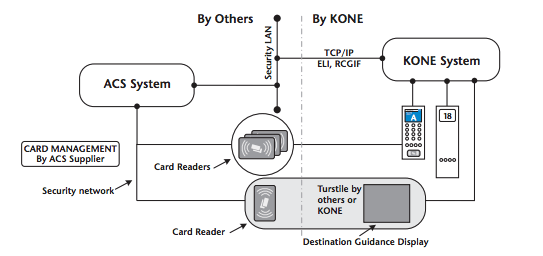
When a traditional DCS is used, the calls are given only from the Destination Operating Panel (DOP). For this reason, the card reader is integrated only with the DOP. Turnstile integration can be done to activate direct to home or call features when a person passes through it.
In these setups, access control is applied before the user enters the elevator, rather than inside the car. This allows the system to assign a specific elevator and destination automatically, improving both security and efficiency.
Access control systems can take pre-determined actions depending on trigger status from external systems, and they can send triggers to external systems like security, fire alarm, video, and emergency systems.
Elevator access control panel #
An elevator access control panel acts as the connection point between the elevator system, the reader, and the access control software. It allows the system to control which floors are accessible based on user permissions.
Elevator access control panels connect to three different main devices:
- The elevator control buttons
- The card reader
- The access control system

Typically, these boards can only restrict access to a certain number of floors, (10 floors in this case), but can be expanded with extension boards that can control another 16 floors each.
For the elevator control buttons, there are typically four wires connecting the button to the elevator system:
- LED + wire
- LED - wire
- GND wire
- Elevator button controlled line
The card reader is typically connected via Wiegand input and the server is connected via TCP/IP or RS485.
In plainer terms: the panel sits between the reader and the elevator's internal wiring, acting as the decision point. When a valid credential is presented, the panel activates the relay for the permitted floor buttons. When no credential is presented, those buttons stay disabled.
Integration of mobile credentials or mobile access with lifts #
Mobile access allows users to authenticate using their smartphone instead of a physical key card, reducing the need for physical credentials while maintaining secure access control.
As we’ve mentioned previously, elevator access control systems typically support two installation paths: relay-based and dispatch-based. With Kisi, for example, both approaches can be integrated depending on the building setup.
For relay-based elevators (the more common setup in legacy or mid-size buildings) the hardware requirements are straightforward: one reader per elevator car, and one controller per four elevator stops. Up to five controllers can be used together for a single elevator. If there’s no internet connectivity inside the elevator car, a retrofitting setup using a two-wire switch and adapter can be used. If an Ethernet port is already available in the car, that provides a simpler setup.
Let's assume you have an existing lift with a regular Honeywell access control panel. Adding Kisi would mean that we can easily connect the Kisi controller relays to the output of the Honeywell system since the elevator buttons are NC/COM. For illustrative purposes, we provided a signal diagram below.
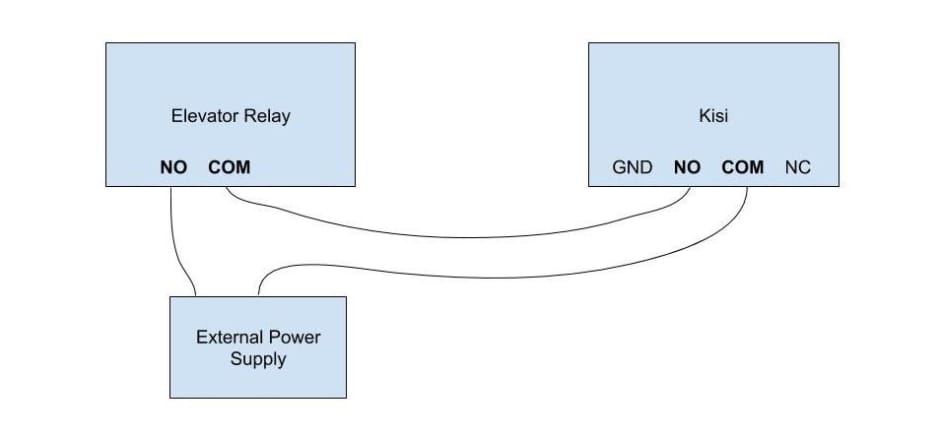
The wiring schematic of connecting Kisi's mobile access control to a Honeywell system allows for cloud-based elevator access control.
For dispatch-based elevators, Kisi integrates through Braxos. This setup is typically used in modern multi-elevator environments where users select their destination at a terminal before entering the elevator. See the DCS section above for how the credential flow works.
In all cases, users must authenticate at a reader before accessing the elevator system. Mobile credentials work the same way as key cards, requiring a tap at the reader rather than interaction purely through an app.
As for credentials, elevator access systems typically support key cards (LF/RFID and HF/NFC depending on the reader model) and mobile credentials via BLE and NFC. With Kisi, these can also include Apple Wallet support depending on the reader model. PIN-based access is available for legacy keypad setups through Wiegand-compatible controllers.
Security vulnerabilities of elevators #
There are numerous potential security vulnerabilities in an elevator access control system. Below, we discuss some of the ways that an intruder can compromise elevator security.
Most access and elevator control systems are one-way only. This means that feedback is not provided when a floor selection button is pressed. Hence, when someone who has multi-floor access rights uses their card, the buttons for all authorized floors will be activated and remain so for several seconds after the card is used. This allows a second person to "piggyback" by selecting a secured floor immediately after the authorized person has used their card.
A direct fix: connect the outputs from the elevator floor select buttons back as inputs to the access control system. This creates an immediate reset the moment a floor button is pressed, preventing a second person from capitalizing on the window. It also lets the system log which floor was actually selected when a card was used, which makes activity reporting more accurate.
Use fire service override #
For obvious reasons, elevator security controls are overridden when the elevator is placed in "Fire Service Mode."
Unfortunately, these are often the same between elevators of the same brand, or within a specific geographical area. This means that anyone having a fire service key to any elevator will have access to all floors. To make matters worse, most fire service keys are also easily available for purchase.
Fire service override is a necessary life-safety function. It exists to ensure emergency responders can reach any floor without delay. The risk is that keys are often shared or easily sourced.
The recommended countermeasure: request a dry-contact output from the elevator control system that closes whenever the elevator enters Fire Service Mode, and connect it as an input to your access control or security management system. That way, relevant personnel are notified the moment any elevator is switched to that mode.
Tailgating #
Even for private elevators with private access, intruders can enter the elevator car with authorized passengers and ride to secured floors. This is because entering and exiting elevators with other people is completely natural, and rarely looks suspicious. People rarely find it suspicious when a person stays on an elevator, as they are simply thought to be continuing to another floor. This often allows the intruder to access their desired floor by waiting until someone calls the elevator for the desired floor.
The most practical mitigations: install video surveillance cameras coupled with access control in every elevator lobby and car, and train employees to challenge unknown individuals rather than assume they belong. For high-security floors, consider barrier walls between the elevator lobby and interior areas. It’s costly, but effective for the floors that genuinely need it.

Mobile credentials can reduce the need to interact with shared surfaces such as keypads or physical access points, which is especially useful in high-traffic buildings.
In Kisi-connected elevators, users can avoid pressing a button to call the elevator, and simply rely on their phone (or smartwatch) to do so. In practice, however, most elevator setups still require users to authenticate at a reader before accessing the system, and then select a floor either inside the elevator or at a destination terminal.
This means that while mobile access can reduce physical contact points, it does not fully eliminate the need for interaction with the elevator system itself.
Depending on the model of the elevator, there may still be buttons to press inside the cabin, but a combination of touchless elevator technology with access control can reduce the number of shared surfaces users need to interact with.
3 types of Kisi elevator access use cases #
Now, can restricted access control for elevators be added easily? Technically, yes, but with some caveats. The use case determines how difficult it is to implement for your organization.
The following sections will outline some common use cases and the optimal solutions. In many cases, the elevator is open for one “welcome” floor, but is configured to be locked for other floors.

Use case 1 #
You want to enable restricted access for the elevator to go from the ground floor to only one floor. The other floors should be openly accessible. Can it work?
The short answer: Great news, the answer is yes! This is the easiest and best kind of scenario for access control systems to work with.
The long answer: To do this, you should wire the Kisi Controller Pro to the elevator’s controller. The long answer here isn’t that much longer than the short answer, which is great, right?
Use case 2 #
You want to restrict the elevator from going from the ground floor to multiple different floors. The access permission gives you permission to access all floors, including either the locked ones or only the unlocked floors. This means there is no differentiated access control for the locked floors. It's locked for all, or if allowed, you can access all locked floors. Can it work?
The short answer: Yes, but there are two different ways to approach it depending on your setup.
The long answer: Below are the two options.
Option 1 — Kisi Reader Pro (supports both card and mobile users)
If you want to use the Kisi Reader Pro, it is possible to use Kisi to go from the ground floor to different restricted floors. However, you'll need to install one Kisi Reader Pro for each floor you want to control access to. This is because you can have multiple readers for one door, but you can't have multiple doors for one reader.
Option 2 — Kisi App and Kisi Controller Pro (mobile users only)
If you want to use the Kisi App to access different floors, you would need one Kisi Controller Pro for every four floors, wired to the elevator's controller. This method, however, would preclude your non-smartphone users from accessing the space, so make sure this is the option that best suits your organization before proceeding.
Use case 3 #
You want to use the elevator to go to select locked floors (i.e., floors 1, 3, and 5) but not others (i.e., floors 2, 4, 6). Can it work?
The short answer: While some advanced elevator systems can support this level of control, it is currently not supported in standard Kisi integrations.
The long answer: This is an advanced requirement that depends on how the elevator controller handles floor-level permissions and whether it allows granular mapping between credentials and individual floors. In many cases, achieving this setup requires deeper integration with the elevator system or the use of destination dispatch logic.
Typically, it would involve an elevator bank with multiple elevators that would also need to be programmed and coordinated. Since this might be coupled with destination dispatch or other advanced programming algorithms, it is currently not possible to implement this scenario using standard Kisi integrations without deeper customization.

Planning an access control upgrade?
Learn what to look for in a system and how to set your deployment up for success.
Conclusion #
Elevator access control plays an important role in managing how people move through a building, especially in environments where different users require access to different floors.
By combining credentials, system configurations, and integration with broader access control systems, buildings can improve both security and operational control without significantly impacting user experience.
We are always looking to provide the best solution at Kisi. If you want to discuss elevator access control in more detail, give one of our experts a call and let us see how we can help.